
Meeting speaker + AI meeting suite
Every voice heard. Every meeting remembered. Every next step clear.
NeMeets is a connected meeting speaker and an AI suite that turns conversations into evidence-linked decisions, tasks and follow-ups, approved by you before anything is sent.
Built for in-person, multilingual meetings Human approval on every output Local-first, cloud only by choice
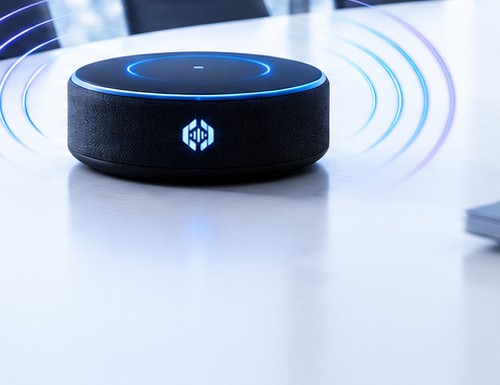
Illustration of the NeMeets 360° meeting speaker on a table, with sound waves radiating outward.
From conversation to next step
Watch a meeting turn into a decision, a task and an approved follow-up.
The transcript stays the source of truth. Every extracted item points back to the words behind it, and a person approves the record before anything leaves the workspace.
Illustrative example, not a recording of a real customer meeting.
The problem
Meetings decide who gets paid. Most of what’s said in them is lost.
-
Voices get missed
People sitting far from the phone, or speaking softly, are not heard clearly — and the record suffers first.
-
Decisions fade
Amounts, deadlines and promises get remembered differently by everyone who was in the room.
-
Follow-ups are slow
Minutes and follow-up emails are written by hand, late — or never written at all.
-
Notes can mislead
AI that invents an owner or a date is worse than no notes. Guesswork has no place in a business record.
The product
One product. From the table to the next step.
NeMeets is not a speakerphone with software attached. It is one system: audio that reaches every seat, an AI suite that understands what was said, and a review step that keeps a person in charge.
-
Capture every voice
360° pickup with four microphones, so quiet voices and the far end of the table are included.
-
AI transcript and summary
A speaker-labelled, timestamped transcript and a summary grounded in the transcript itself.
-
Decisions and tasks
Decisions, tasks, owners, dates and open questions — each one linked to the words that support it.
-
Follow-ups and approvals
Follow-up drafts for email or WhatsApp, sent only after a person has reviewed and approved them.
How it works
Seven steps, and a person at the end of every one.
The workflow is deliberately conservative: capture, understand, check, then let someone decide what happens next.
-
01
Set up the speaker and record consent
Place the speaker, connect it, and record that participants agreed to be recorded. A clear recording indicator stays visible.
-
02
Capture the meeting, or import a recording
Record in the room or bring in an existing file. The original audio is preserved unchanged.
-
03
Transcribe, label speaker turns, add language hints
Speech is detected and transcribed with timestamps. Turns are labelled Speaker 1, Speaker 2 and so on — never guessed identities.
-
04
Extract what the meeting actually produced
Topics, decisions, tasks, owners, dates, open questions and customer requirements are pulled out in structured stages.
-
05
Check every item against the transcript
Anything unsupported, ambiguous or low-confidence is flagged or withheld. Nothing is filled in to make a section look complete.
-
06
Review, correct and approve
Replay the audio, fix errors, name the speakers, inspect the evidence behind each item, then approve the record.
-
07
Export, or send an approved follow-up
Take the record out as Word, PDF or text, or send the follow-up draft you just approved.
The speaker
Meeting audio that reaches every seat.
A compact 360° conference speaker built for group conversation — not for one person leaning into a laptop.
- 360° voice pickup with four omnidirectional digital microphones.
- Noise and echo reduction with voice enhancement for clearer speech.
- Full-duplex conversation — people can speak and listen at the same time.
- Physical mute and volume controls, with a visible mute indicator.
- USB-C and Bluetooth connections, wired or wireless.
- Link compatible speakers to extend coverage for larger rooms.
Hardware specifications are from the reference design and will be confirmed on the final production model. Coverage depends on room acoustics and placement.
The AI meeting suite
Everything a meeting is supposed to leave behind.
Speaker-labelled transcript
Timestamped turns, with names you assign during review.
Summary and topics
A concise account of what was discussed, built from checked items.
Decisions and commitments
What was agreed, stated plainly and linked to the evidence.
Tasks with owners and dates
Only when the owner and date were clearly stated. Otherwise flagged.
Open questions
What was raised but left unanswered, so it comes back to the table.
Customer requirements
Requirements, budgets and delivery preferences from customer meetings.
Review and correction workspace
Replay audio, fix text, rename speakers, approve the record.
Exports
Word, PDF and plain text, from the approved version.
Follow-up drafts
Drafted for email or WhatsApp, in the language of the meeting.
Companion app
Review and approve from anywhere.
Start a meeting yourself, import a recording, read the summary, fix a name, approve the record, and get reminders for the tasks you approved — from the phone already in your hand.
- Capture a meeting you start yourself
- Import recordings and sync the record
- Review, correct and approve outputs
- Reminders for approved tasks
Capture is always user-controlled and requires consent and device permissions.
Languages
Built for the way people really talk.
English and Hindi first. Gujarati and more languages are added as we measure accuracy on real meetings. Mixed-language conversations are tested, not assumed.
The original-language transcript is always preserved, and any translation is clearly labelled. Language hints sit at segment level, so one meeting can contain more than one language.
- EnglishFirst
- हिन्दी · HindiFirst
- ગુજરાતી · GujaratiNext
- More languagesPlanned
Status reflects what is being tested, not a claimed accuracy figure.
Trust and privacy
You stay in control.
Meetings are where businesses say things that matter. The system is designed so that the decision to record, process, keep or send always belongs to a person.
-
Consent first
Consent is recorded before capture, and a clear recording indicator is shown for as long as capture runs.
-
Human approval
Nothing is exported or sent until a person has reviewed it and approved it.
-
Local-first
Processing runs locally where supported. Any cloud processing is disclosed and chosen by you, not assumed.
-
Traceable
The original audio is preserved, with an audit trail of corrections, approvals and who made them.
-
Controlled access
Roles, retention and deletion controls, as implemented in your workspace.
-
Where we are, honestly
We are building toward these controls and will publish validated details as they are completed.
Use cases
Where the next step usually gets lost.
-
Business owners
Weekly reviews and planning meetings, where decisions need owners and dates before the week runs away.
-
Sales teams
Prospect calls and client visits, where requirements, objections and budgets are easy to lose.
-
Consultants and agencies
Client workshops, strategy sessions and kick-offs that have to turn into a clear brief.
-
Project teams
Status meetings and handovers, where unresolved questions need to stay visible.
-
Large rooms and hybrid teams
Bigger tables and mixed rooms, where linking compatible speakers extends coverage.
-
Training and education
Workshops and training sessions, where topics, summaries and open questions matter after the room empties.
Status and roadmap
Where we are.
We would rather tell you what is not finished than imply it is. This is the honest state of the product.
-
Defined
Full product scope and Version 1 workflow
- Capture → transcript → decisions and tasks → review → approved follow-up
- Evidence links, uncertainty flags and human approval
- Single-speaker and linked-speaker configurations
-
Next: pilots
Hardware validation and accuracy testing
- Real English and Hindi meetings with design partners
- Coverage, echo and linking tests in real rooms
- Correction time and evidence quality, measured and published
-
Later
Only once the core is proven
- Live transcription
- Cross-meeting search
- Calendar and CRM integrations
- Translation and spoken summaries
Design partners
Run client meetings, sales calls or team reviews? Join the pilot.
We are working with a small number of teams to test capture quality, transcript accuracy and the review workflow on real meetings. Tell us how you meet and we will get back to you.
- Consent-first pilot setup
- English or Hindi meetings
- Findings shared back with you
FAQ
Straight answers.
If something here is still unclear, ask us directly. We would rather answer than overclaim.
Is it just a speakerphone?
No. It is a meeting speaker plus an AI suite that produces a reviewable record — transcript, summary, decisions, tasks, open questions and requirements — and approved follow-ups.
Does the AI send messages by itself?
No. Follow-ups are drafted, then a person reviews and approves them. Nothing is sent from an unreviewed or uncertain output.
Which languages work?
English and Hindi first. Gujarati and other languages are added as accuracy is proven on real meetings, and we do not quote accuracy figures before we have measured them.
Where is my data processed?
Locally where supported. Any cloud processing is disclosed and chosen by the customer — never switched on quietly.
Does it record automatically on my phone?
No. Capture is user-controlled, with consent, and subject to device permissions. There is no always-on recording.
Is live transcription available?
Not in the first version. It is on the roadmap, and we will only describe it as available once it is built and tested.